The cascade weight field lets NATS randomly switch between two or more cascades, giving precedence to the cascade with the higher weight. This option can be found under Biller Cascades in the Billers Admin.
Finding the Weight setting
Go to the Billers Admin and Edit your desired cascade.
If more than one cascade with the same description exists in your system, then
NATS automatically selects which cascade to use when the join form loads. This selection is based on the total weight of all cascades that share a description. Figure 1.4 depicts how this process works:
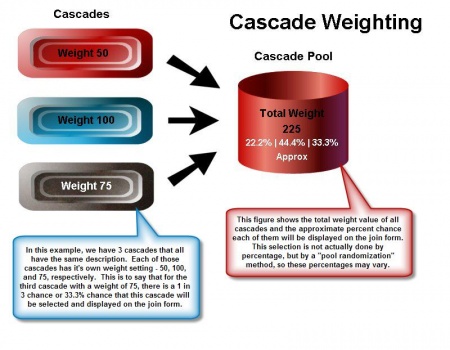
Figure 1.4 provides an example of a cascade scenario that involves three
cascades, all with the same description and different weight values.
NATS then creates a "pool" of all the similar cascades. This "pool" contains 75 copies of the Third Cascade, 100 copies of the Second Cascade, and 50 copies of the First Cascade for a total of 225.
After NATS creates this pool, it randomly selects which
cascade to use from said pool, which means that the more "entries"
that there are in this pool for a single cascade, the higher the probability it
will be selected.
For NATS version 4.1.19.1 or higher, the Cascade weight feature will now work with auto and normal cascades with same description.
Other than this number setting, there are three other options available for weight:
Using cascade weight for cascade based splitting of different join options
NATS allows an admin to show specific options and xsell options based on a specific cascade. This is useful in cases where you have more than one xsell for a specific biller, but you would like these to both display in a specific interval.
For this setup, an additional cascade is needed. Most times, a 1 to 1 copy of your existing cascade is what is needed.
You'll want to ensure that the cascades being used for this process have matching cascade descriptions, as they will need to match in order for the cascade weights will take effect
The following will be based off of a setup where there are 2 cross sale join options for a biller and would like to have these cross sale join options split as 30/70. This setup can be modified for additional options and cascades, this is a basic example.
Once you have your two cascades, set one weight to 30 and weight to 70
ex. id 2 set to weight: 30
ex. id 3 set to weight: 70

For the cross sell (xsell) setup, the outgoing xsells rules to need to be setup to only be available for one of these cascades.
For this example, we would be looking at outgoing xsells, id 1 and id 2
For xsell id 1 create an 'ENABLE' rule where where the column 'cascade' is set to cascade id 1. You can find this column when setting up a new rule by clicking the 'Advanced Form' link.

For xsell id 2 you would have an 'c' rule and set the 'cascade' to id 2.

Additional rule limitation may be added here to further restrict these rules as needed.
As per the example provided, the two cascades will be weighted 30/70. The xsells are set to display only for their respective cascade that is set in the 'ENABLE' rule.
Once a surfer hits the join page, NATS will decide which cascade (id 2 or 3) will be shown.
When cascade id 1 is used, only xsell id 1 will be displayed.
When cascade id 2 is used, where only xsell id 2 will be displayed.


