Qualified Join Page Hits
Qualified Join Page Hits are an additional statistic in NATS that can be used in many ways. For example, if you had a multi-page tour and wanted to see how many surfers clicked through to the last (join) page, you could put a qualified link at the second to last page which would redirect to the last page. This Qualified Click Link would then measure only traffic that go to the final page of your tour, allowing you to classify this as good traffic.
Setting Up a Qualified Link
To set up a Qualified Click Link, go to the Sites Admin and click the "Edit Site Details" icon. From here we can see that the top link under Default Links/Codes for Default Tour is a Qualified Click Link.
Copy this link to the page you would like it to appear on (in our example it would be the second to last tour page), and replace the original link with the Qualified Click Link. Once you have done this, replace the page.html at the end of the Qualified Click Link with the name of the page you have put the link on.
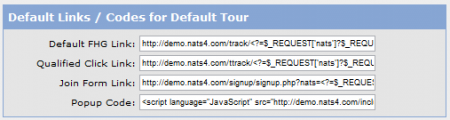
Once this is done you will be able to track certain page hits, such as pre-join page hits as qualified hits and classify them in your statistics page appropriately.
NATS also offers a shortcut alternative to the standard Qualified Click Link. To do tracking of click through stats without the specific link, you can add &qualify=1 to the end of the pre-join page link. This will function similarly to a Qualified Click Link, as it will track how many viewers clicked through that particular link, allowing you to classify them however you wish.

